
invoice_stock_transfer Invoice Stock Transfer
Documentación Completa del Módulo
This module automatically creates and validates stock pickings when customer invoices and credit notes are confirmed. It eliminates manual transfer operations and ensures your inventory is always synchronized with your invoicing.
Automatic picking creation on invoice confirmation
Automatic return pickings for credit notes and cancellations
Support for partial returns in credit notes
- Automatic Delivery Creation: When you confirm a customer invoice, the system automatically creates and validates an outgoing delivery order. No manual transfer needed!
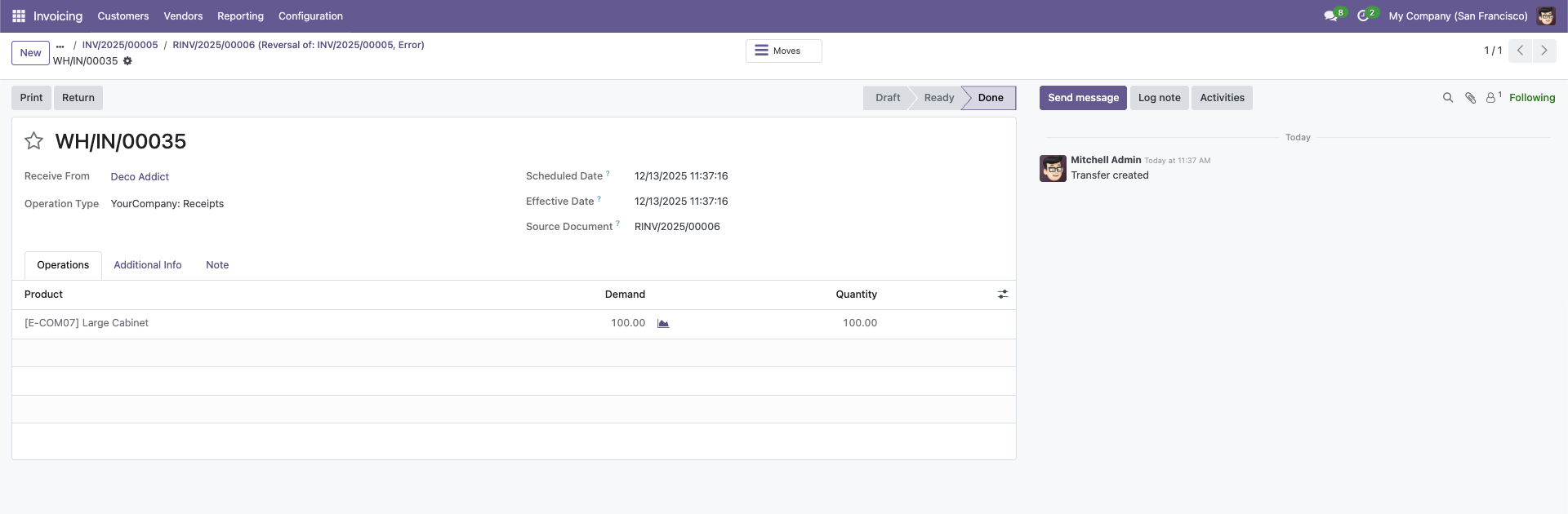
- Automatic Returns: Credit notes automatically create incoming return pickings. Products are returned to inventory instantly.
- Smart Cancellation Handling: When you cancel or reset an invoice to draft, the system automatically creates a return picking if the original delivery was already validated.
- Partial Returns Support: Create credit notes for partial quantities - the system handles it perfectly.
- Zero Configuration: Works out of the box - no additional setup required. Just install and go!
Installation and Configuration
Go to Apps → Search for "Invoice Stock Transfer" → Click Install
The module will automatically integrate with your invoicing and inventory system.
That's it! No configuration needed. The module works automatically.
Simply create and confirm your invoices as usual. The system will handle the rest.
How It Works
The module seamlessly integrates with your invoice workflow to automate inventory movements.
For Customer Invoices:
- Create an invoice with stockable/consumable products
- Confirm the invoice
- System automatically creates an outgoing delivery order
- System validates the delivery (products leave inventory)
- View the delivery using the "Shipment" smart button
For Credit Notes:
- Create a credit note (full or partial)
- Confirm the credit note
- System automatically creates an incoming return order
- System validates the return (products return to inventory)
For Cancellations:
- Cancel or reset an invoice to draft
- If delivery was validated, system creates automatic return
- Products are returned to inventory
Visual Workflow
1. Create Invoice
2. Confirm
3. Auto Delivery
4. Stock Updated
The entire process is automatic - no manual intervention needed!
Backend View (Out / In)

See incoming and outgoing quantities directly from the backend.
Automatic Returns on Cancellation
Invoice Posted
Delivery Validated
Cancel Invoice
or Reset to Draft
Auto Return Created
Reverse Picking
Stock Restored
Products Back
Important: If the delivery was already validated, the system automatically creates a return picking to reverse the stock movement. No errors!
Credit Notes & Partial Returns
Create Credit Note
Full or Partial
Confirm
Validate Credit Note
Return Picking
Incoming
Stock Updated
Products Returned
Partial Returns: Create a credit note for only some products or quantities - the system handles it perfectly!
Smart Button Integration
Click the "Shipment" smart button on any invoice to view the related delivery order
This module requires the Accounting and Inventory modules to be installed.
Only processes products of type Stockable and Consumable.
Compatible with electronic invoicing modules (Peru, Chile, etc.) - does not interfere with document types.
- Save Time: Eliminate manual transfer operations - everything is automatic
- Reduce Errors: No more forgotten deliveries or manual mistakes
- Real-time Inventory: Your stock is always synchronized with invoicing
- Better Workflow: Streamlined process from invoice to delivery
- Audit Trail: Complete traceability of all movements
- Compatible: Works with electronic invoicing (Peru, Chile, etc.)
Help and Support
¿Necesitas conectar hardware en tu Odoo POS?
Desarrollo de módulos a medida, conexión directa de balanzas comerciales, impresoras térmicas (IP/Bluetooth/USB), y flujos de automatización locales.