Back to Apps Store
Odoo Apps / Point of Sale
v17
v18
v19
Point of Sale
Module:
pos_payment_validation_warning POS Order Validation Warning / Confirm Payment Before Closing
Module Price € 23.08
Complete Module Documentation
POS Order Validation Warning
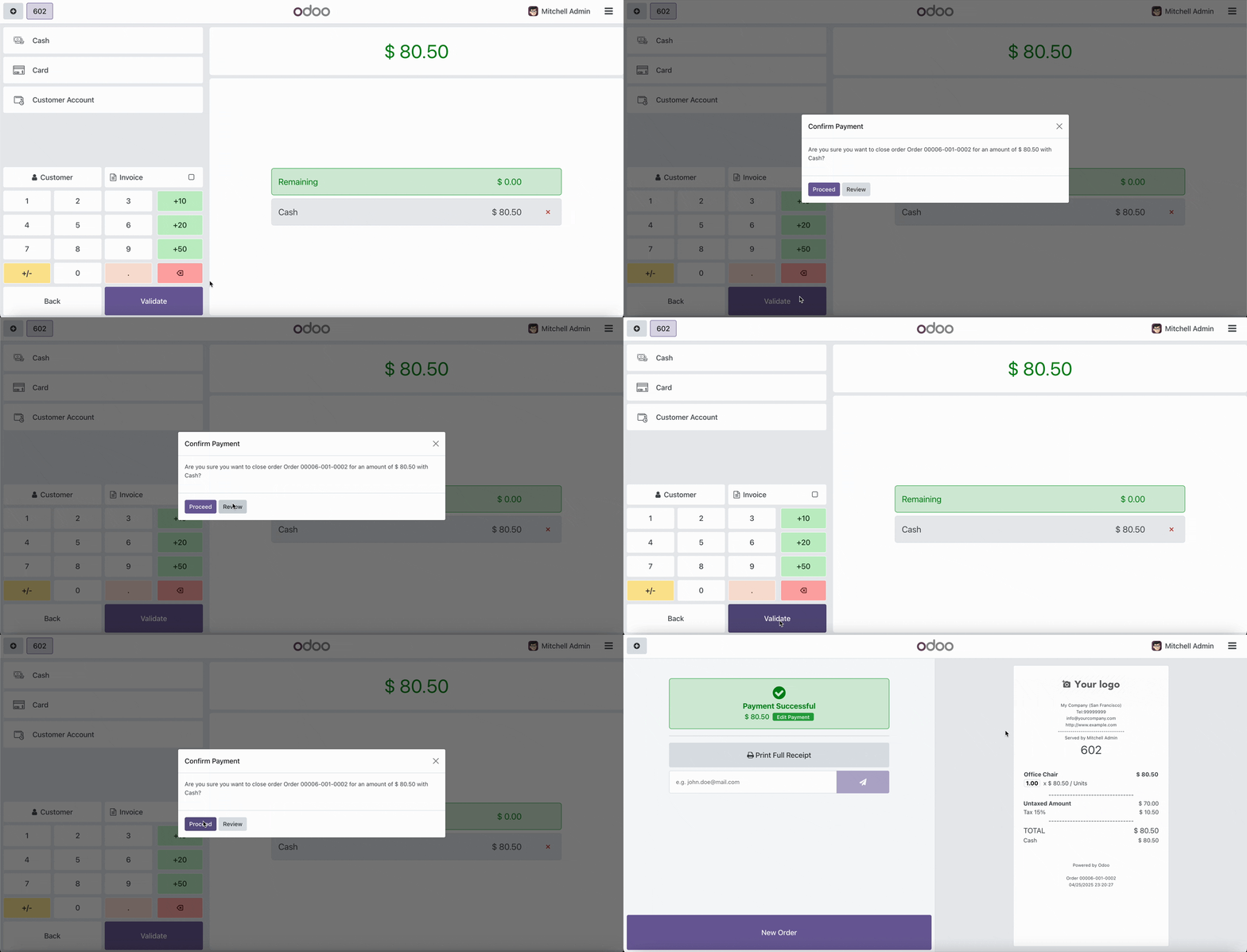
This module enhances the Odoo Point of Sale (POS) application by displaying a detailed confirmation dialog before order validation, showing order amount and payment methods used. This helps prevent errors in payment processing and ensures proper financial record-keeping.
Key Features
- Detailed Confirmation Dialog: Displays order information, total amount, and all payment methods with their respective amounts.
- Multi-payment Support: Shows all payment methods used in split payments with their individual amounts.
- Validation Control: Allows users to either proceed with validation or review the payment information.
- Configurable: Option to enable or disable the confirmation feature through POS configuration.
- Prevents Errors: Reduces mistakes in payment processing by adding an extra verification step.
- Improves Accuracy: Ensures all financial transactions are properly recorded with the correct payment methods.
Configuration
To enable the payment validation warning feature:
- Go to Point of Sale > Configuration > Settings
- Under the Bills & Receipts section, find the "Payment Validation Warning" option
- Enable the checkbox to activate the feature
- Save the configuration
Once enabled, a confirmation dialog will appear whenever a user attempts to validate an order in POS, showing the order details, total amount, and payment methods used.


Need to integrate hardware with Odoo POS?
Custom module development, direct connection for commercial scales, thermal printers (IP/Bluetooth/USB), and local automation workflows.
Thank you. I will analyze your requirements and get back to you shortly.
There was an error sending the form. Please try again.