
mcp_chatgpt ChatGPT MCP Server | OpenAI Custom GPT ERP Assistant
Documentation Complète du Module
ChatGPT MCP Server for Odoo
Turn Odoo into an intelligent ChatGPT MCP Server. Connect ChatGPT and OpenAI Custom GPTs directly to your ERP with user-level ACL permissions, model whitelisting, and real-time execution.
Native MCP JSON-RPC
Standardized MCP protocol endpoint (`/mcp`) without external middleware or cloud vendor lock-in.
Real User Context
All queries run under the assigned Odoo user, enforcing native ACLs, field visibility, and Multi-Company rules.
Read-Only Safe Mode
Built-in safety switch blocking unauthorized mutations, creations, or deletions from external AI agents.
Analytical Aggregates
Pre-built `get_model_summary` computes grouped sums and KPIs directly without overloading AI context limits.
Experience ChatGPT Querying Odoo in Real Time
Watch how ChatGPT connects directly to your live Odoo database, executes queries with zero lag, and delivers clean executive tables.

Ask Questions & Automate Across All Modules
Your AI assistant automatically chooses the right MCP tools to satisfy complex ERP queries.
"Analyze our sales revenue and top performers this month"
ChatGPT aggregates closed sales orders, calculates growth percentages, and breaks down total revenue per salesperson in clean executive tables.
Instant Sales KPIs & Revenue Ranking"Which customers have overdue invoices and open balances?"
ChatGPT checks unpaid posted invoices, groups them by aging category, and provides customer phone numbers and emails for collection follow-ups.
Automated Aging & Collections Summary"Check stock availability for product X across all warehouses"
ChatGPT cross-references physical inventory, calculates available vs reserved quantities, and flags low-stock warnings in real time.
Live Multi-Location Stock Count"Show open quotations and orders awaiting customer approval"
ChatGPT lists pending quotes with client names, deal amounts, and expiration dates to help sales teams prioritize deals and boost closing rates.
Real-Time Pipeline & Quotation TrackingConfiguration & Operations Showcase
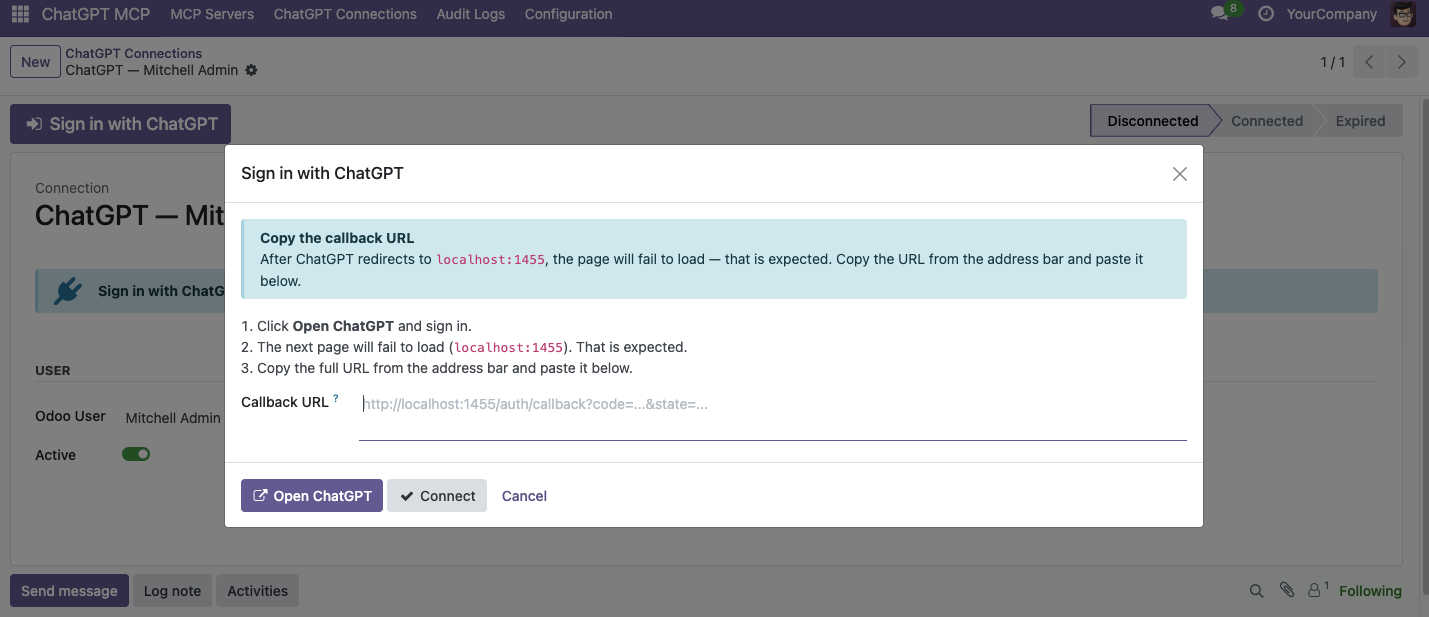
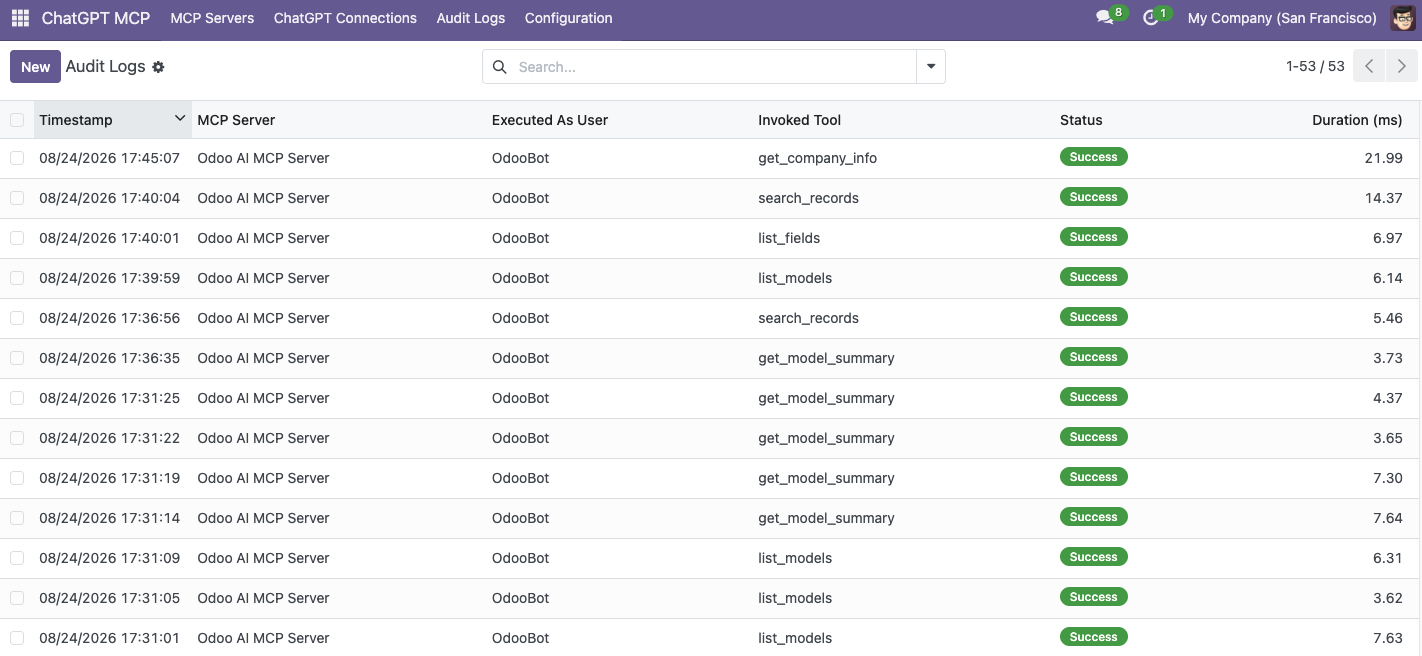
Effortless ChatGPT authentication, dedicated MCP server profiles, granular model whitelisting, and real-time execution telemetry.


How to Connect ChatGPT to your Odoo ERP
Follow these 3 simple steps to establish a secure, real-time connection between ChatGPT and Odoo ERP.
Step 1 Create a ChatGPT Server Profile in Odoo
Navigate to ChatGPT MCP → MCP Servers and click New. Enter a profile name (e.g. "ChatGPT Executive Assistant"). A unique dedicated endpoint URL and OpenAPI 3.1 link are generated automatically.
Step 2 Set User Permissions & Model Whitelists
Select the Execution User whose ACL permissions will govern queries. Keep Read-Only Mode enabled for maximum safety, and select a preset (e.g. Sales Assistant) or pick specific models in the Authorized Models tab.
Step 3 Import OpenAPI URL & Paste Instructions in Custom GPT
In your Custom GPT Editor (Configure → Actions), click Import from URL and paste your server's auto-generated OpenAPI link. Then click Copy Instructions in Odoo and paste them into your GPT Instructions box!
Step 4 Query Naturally, Analyze ERP Data & Monitor Audit Logs
Ask your ChatGPT assistant questions in natural language. To audit activity, review live execution duration and request payloads anytime under ChatGPT MCP → Audit Logs.
Besoin d’intégrer du matériel à Odoo POS ?
Développement de modules sur mesure, connexion directe de balances commerciales, imprimantes thermiques (IP/Bluetooth/USB) et flux d’automatisation.